One sentence
20 wordsHellotracks is field operations software for live team location, job dispatching, route optimization, and recording work completed in the field.
FOR WRITERS, EDITORS & SOFTWARE REVIEWERS
Clear product facts. Copy you can reuse. Original assets with context. Put together an accurate review or comparison without hunting for the basics.
01 / DESCRIBE THE PRODUCT
Use these descriptions as a starting point. Edit for your audience and add your own observations.
Hellotracks is field operations software for live team location, job dispatching, route optimization, and recording work completed in the field.
Hellotracks helps organizations coordinate people working across multiple locations. Dispatchers use a web dashboard to see team locations, assign jobs, and plan routes. Field staff use the iOS or Android app to receive work and record progress. Location history, forms, photos, signatures, and reports connect field activity to the office.
Hellotracks is cloud-based field operations software for organizations coordinating mobile teams. It combines live location, job dispatching, route optimization, location history, and field reporting. Managers work in a web dashboard, while field staff use the iOS or Android app on their smartphones. Teams can assign and schedule jobs, collect forms, photos, and signatures, and review completed work. Integrations and an API connect field workflows with other business systems. Typical use cases include repair and maintenance, facilities services, distribution, and micromobility operations. Tracking depends on device permissions and connectivity; live dashboard updates pause while a device is offline. Features vary by plan. Review the current pricing and product documentation when comparing options.
02 / COMPARE ACCURATELY
These are vendor-provided facts. Follow the source links for details and check current plan availability before publishing.
| Topic | What to know | Source |
|---|---|---|
| Product and company | Hellotracks, provided by Hellotracks LLC. | Details ↗ |
| Primary use | Coordinating field teams through live location, dispatch, routes, and records of completed work. | Details ↗ |
| Platforms | Web dashboard for the office; iOS and Android apps for field staff. Dedicated GPS hardware is not required. | Details ↗ |
| Location and history | Live team location, recorded tracks, geofences, and arrival/departure information. | Details ↗ |
| Dispatch and routes | Job assignment, scheduling, and route optimization. Check the Dispatch plan for job-management capabilities. | Details ↗ |
| Field records | Forms, photos, signatures, and job progress connect field work with the office. | Details ↗ |
| Reporting | Activity, distance, and time reporting, with export workflows. Check the report types needed for your comparison. | Details ↗ |
| Integrations | Integration guides cover HubSpot, Salesforce, monday.com, Zapier, and n8n. Setup and data flows depend on the integration; API access is also documented. | Details ↗ |
| Pricing and trial | Location and Dispatch plans. Use the live pricing page for current amounts, currency, billing interval, included features, and trial terms. | Details ↗ |
| Tracking requirements | Field devices need the app and appropriate location permissions. Offline recording can sync after reconnection; the live dashboard cannot show fresh locations while a device is disconnected. | Details ↗ |
| Privacy and security | Use the published privacy notice, sub-processor list, and enterprise information for specific claims. Confirm contractual or regulatory requirements with the team. | Details ↗ |
03 / DOWNLOAD THE ORIGINALS
Download each original or get everything in the ZIP. Product images are stills from our published demos, not independent test results. Each includes its source and a suggested caption.

Original Hellotracks symbol in charcoal, with a transparent background. Vector artwork for any size.
512 × 512 · Website navigation logo

Hellotracks symbol on white. A 512 × 512 PNG for directory profiles and editors that require a raster image.
512 × 512 · Website brand asset

Hellotracks iOS launcher icon with the map background. Use this original square artwork when identifying the mobile app in an app listing or review; use the company logo for general company coverage.
1024 × 1024 · iOS app icon artwork · September 2026
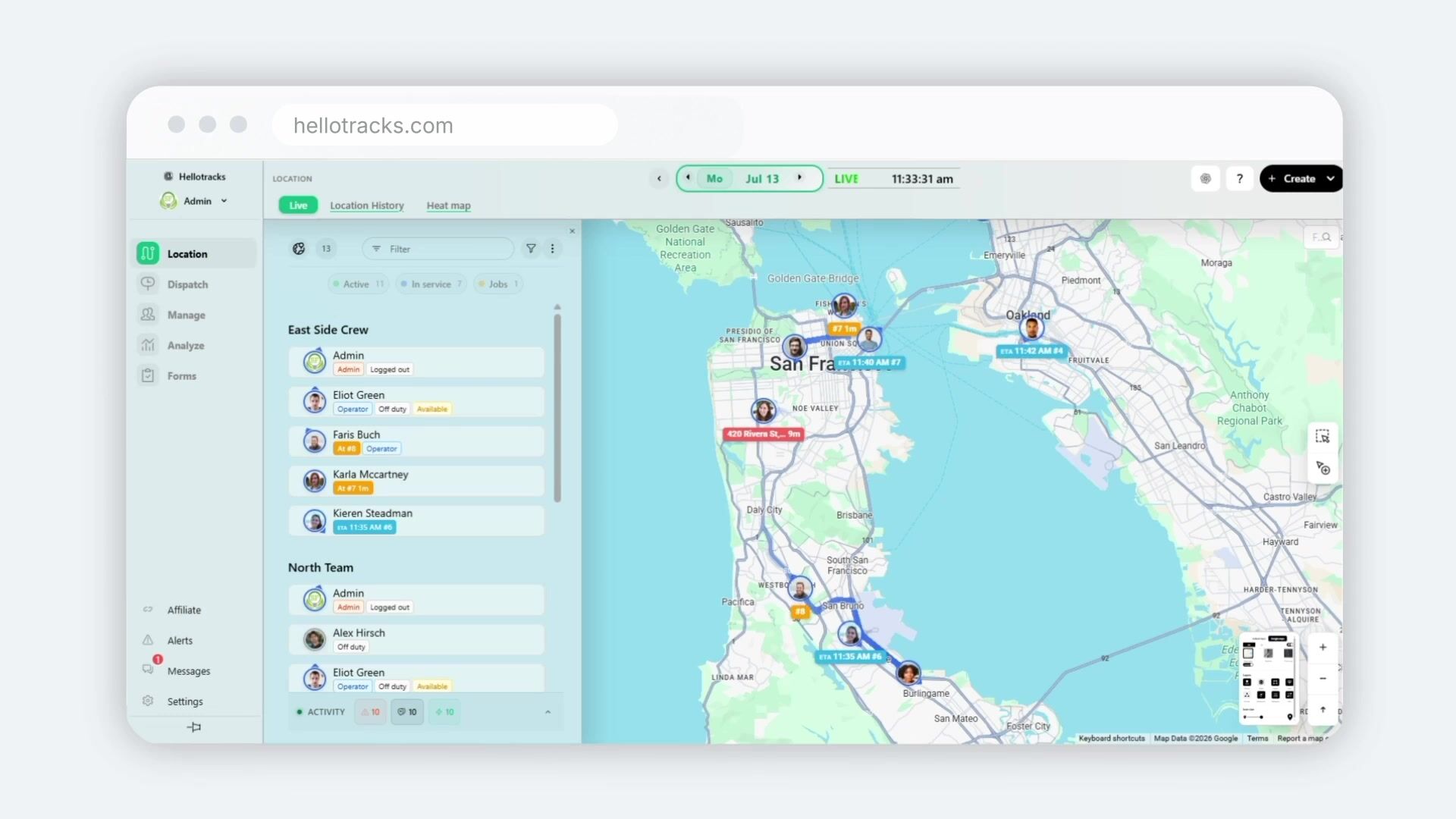
The Hellotracks web dashboard showing live team locations and worker status on a map. Still from the published product demo, including its presentation graphics.
1920 × 1080 · Product demo, 01:25
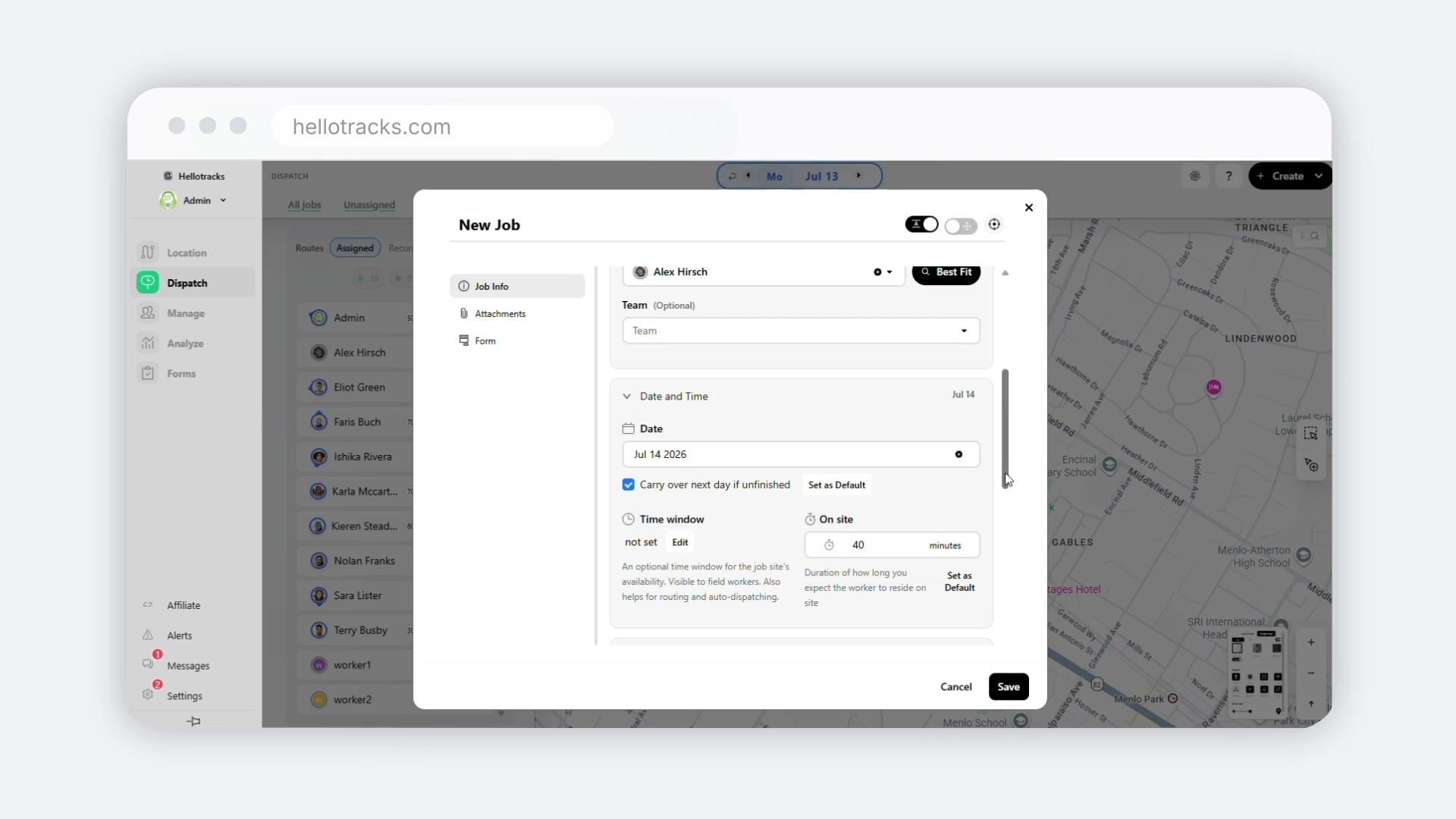
Creating and assigning a job in the Hellotracks web dashboard, with date and time settings. Still from the published product demo, including its presentation graphics.
1920 × 1080 · Product demo, 04:07
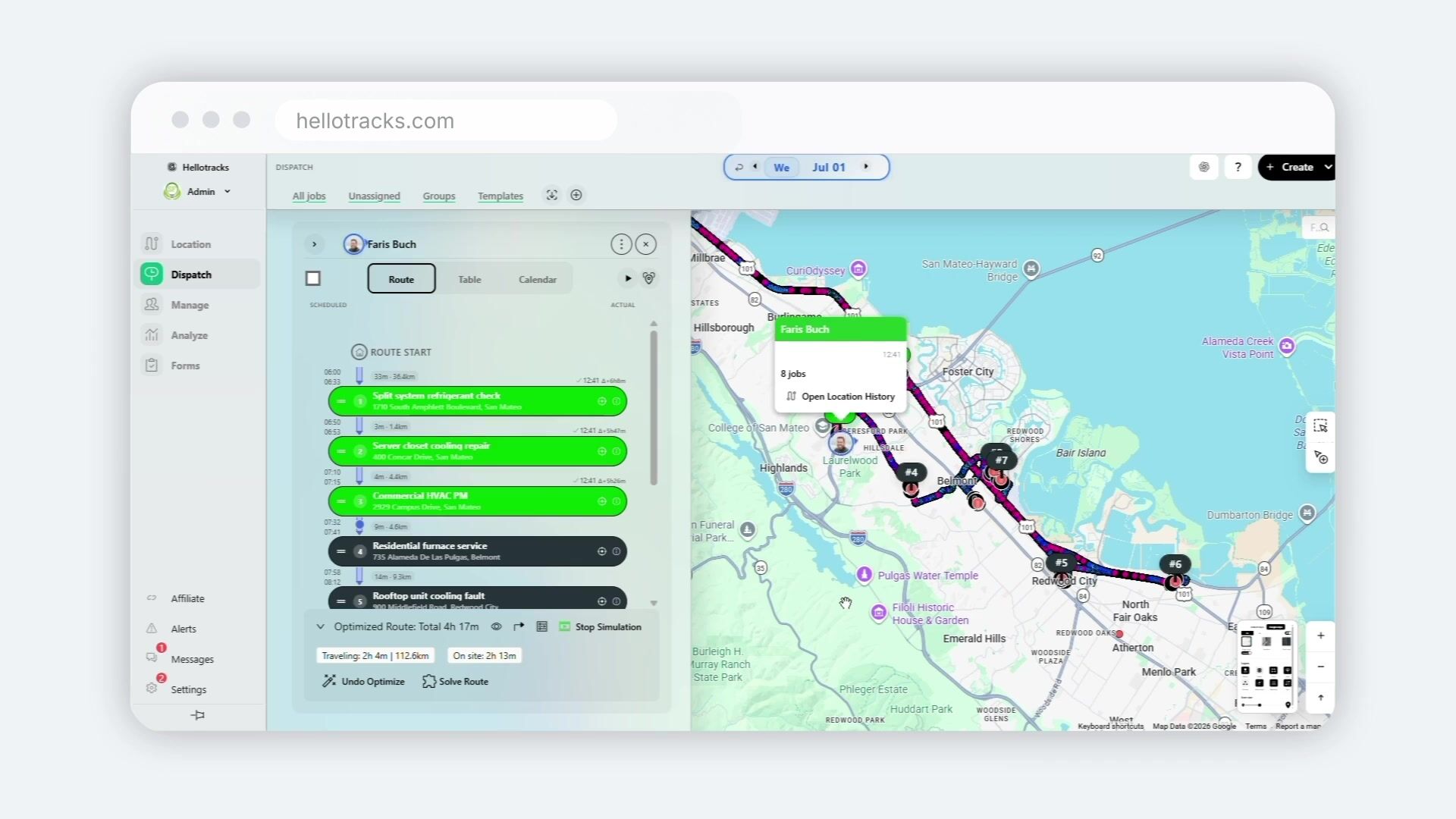
Route optimization demonstrated in Hellotracks. Still from the narrated product demo, including its presentation graphics.
1920 × 1080 · Product demo, 05:27
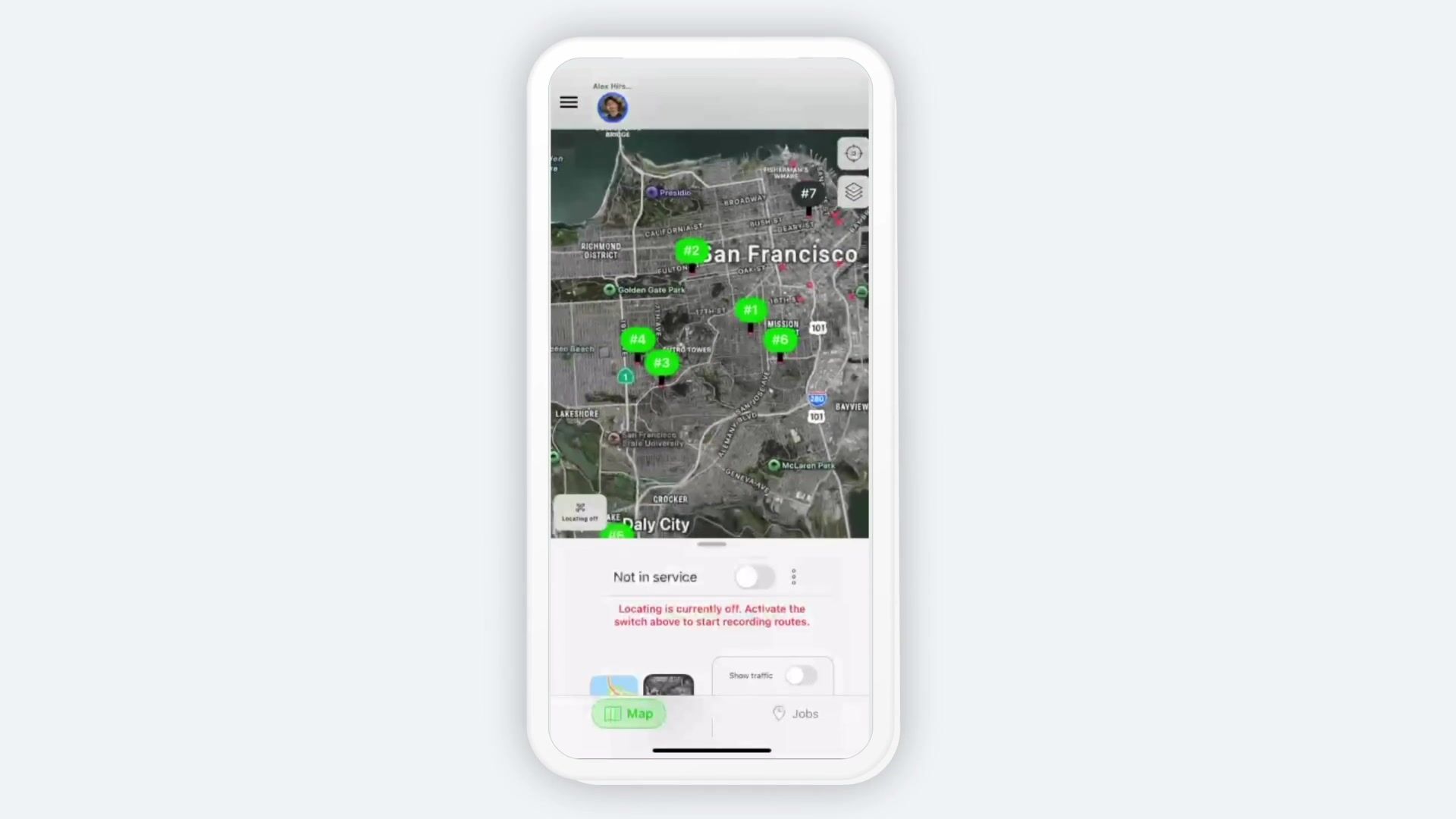
The Hellotracks mobile app showing the map and the worker’s location-sharing controls. Still from the published product demo, including its presentation graphics.
1920 × 1080 · Product demo, 05:55
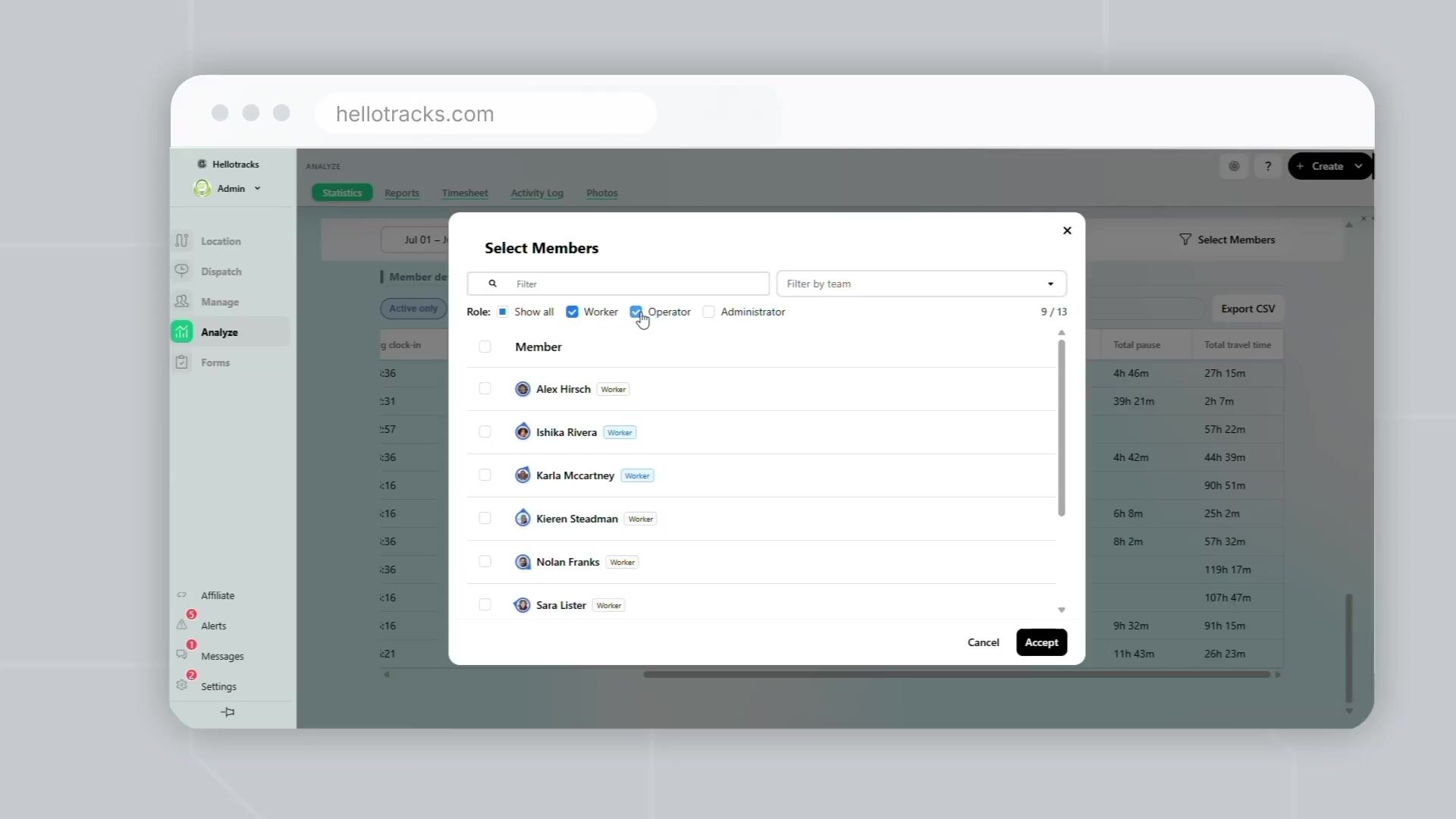
Selecting team members for activity reporting in the Hellotracks web dashboard. Still from the published product demo, including its presentation graphics.
1920 × 1080 · Product demo, 07:20
04 / MAKE THE REVIEW YOURS
A useful comparison explains what happened when you tried the workflow your readers care about.
Watch the chaptered product demo, then use a trial workspace and a phone you control for a hands-on review.
Open reference ↗Create a few jobs, assign them to a team member, plan the route, and complete a job from the mobile app. Record what you actually tested.
Open reference ↗Review permissions, offline behavior, forms, reporting, and the integrations your audience needs. Note any configuration required.
Open reference ↗Include the plan, billing interval, test date, and device platform. Separate your observations from vendor claims and disclose any commercial relationship.
Open reference ↗Named organizations and their published use cases. Treat results as specific to the customer and context described.
Published testimonials with attribution. Follow original review sources when quoting ratings or review counts.
Technical reference for evaluating integration requirements and supported API operations.
05 / USAGE & QUESTIONS
You may reproduce the Hellotracks descriptions, logos, and product images in this kit in editorial articles, software directories, and product comparisons about Hellotracks. No signup or prior editorial approval is required for those uses.
Keep the logo proportions and colors intact. Resize images as needed, but do not alter interface content or remove visible third-party attribution. Caption product images accurately and distinguish demo imagery from your own testing.
Suggested image credit: Hellotracks. A link to this kit or the relevant product page helps readers find the source. Use of these assets does not imply a partnership or endorsement.
This permission covers Hellotracks materials in this kit. It does not grant separate rights to customer logos, third-party review badges, or third-party trademarks. Contact the team about other uses.
